

To use our Browse Abandonment Flow, your account must be integrated with Shopify or Shopify Plus.
Create a New Flow
To create a new Browse Abandonment Flow:- Navigate to Flows and click New Flow in the upper right corner.
- Select Browse Abandonment from the menu.
- Click Customize Flow to continue.
Name your Flow
To name your new Flow:- Click on the title in the upper left corner.
- Select “Edit template” from the dropdown menu.
- Update the name and Save.
Build your Flow
Our Flow builder allows you to easily add and edit emails, text messages, time delays, Split Flows, and Tag Contact actions at any point of your Flow. To add a new email, text message, time delay, or split to your Flow:- Click on the plus sign in the area you’d like to add your new block.
- Select the desired action from the following menu.
Customize your Settings
Select the Trigger block at the top of your Flow. Your Flows’ settings will appear on the right side of the builder.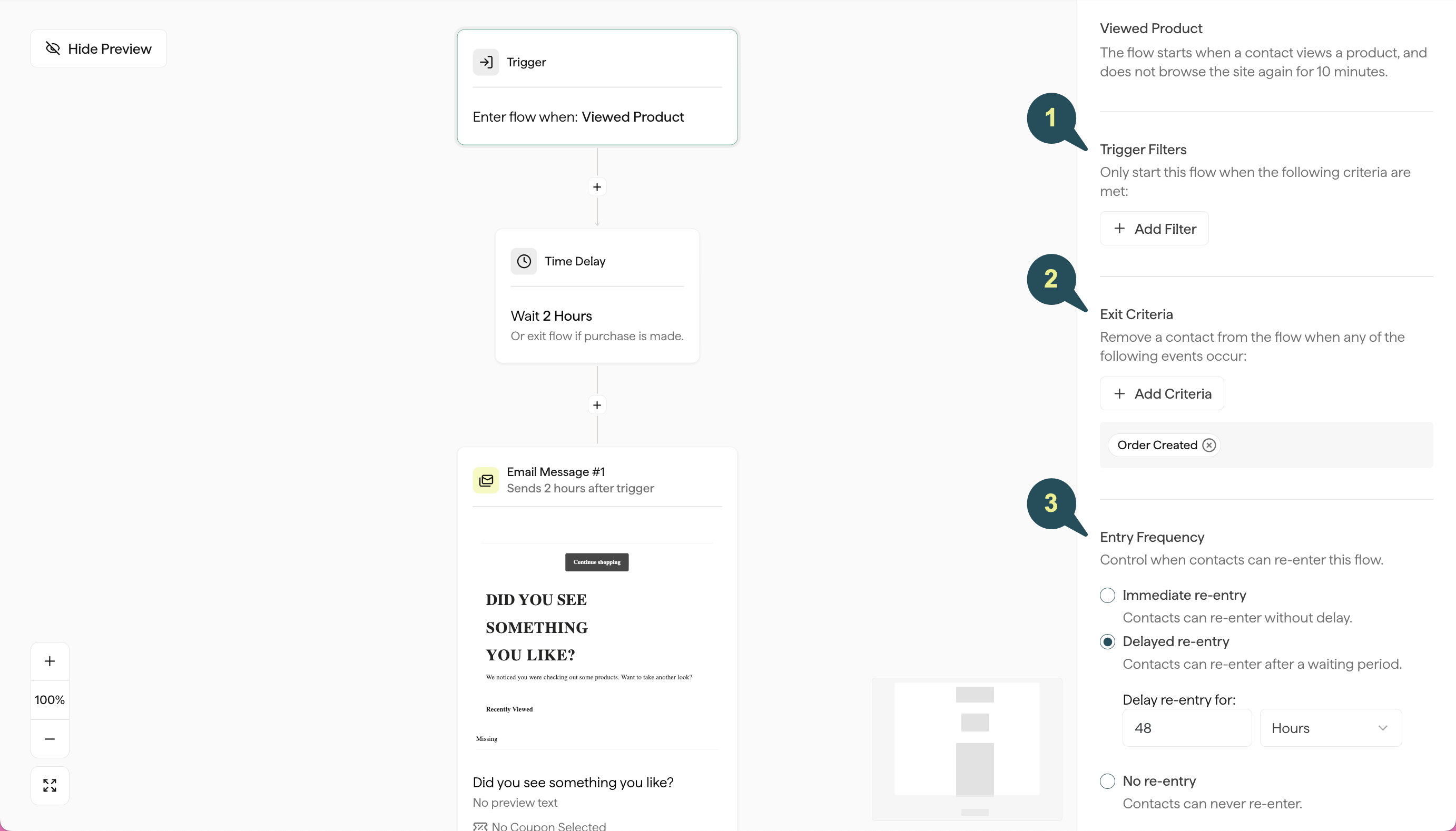
Flow Filters
For Browse Abandonment, you have the option to add the following filters to customize which contacts are allowed to enter this Flow:- Products Viewed: Target contacts based on the specific products they did or did not view.
- Product Viewed from Collection: Target contacts based on whether the products they viewed belong to specific Shopify collections.
- Total Number of Products Viewed: Target contacts based on the total number of products viewed within their session.
- Minimum Price of Products Viewed: Target contacts based on the dollar amount of the products viewed.
- Skip Contacts in an Active Flow: Exclude contacts that are currently in the middle of another Flow, such as Welcome or Abandoned Cart emails.
Exit Criteria
Adding this criteria will automatically remove contacts from your Browse Abandonment Flow as soon as they take one of the following actions:- Order Created: The contact adds a product to cart and subsequently places an order.
- Product Added to Cart: The contact adds a product to their cart.
- Checkout Started: The contact starts checkout.
Entry Frequency
Control how often contacts are allowed to re-enter this flow after they’ve already received it:- Immediate re-entry: Contacts can re-enter this Flow without a delay.
- Delayed re-entry: Contacts can re-enter this Flow as long as a certain period of time has passed since they last received it.
- No re-entry: Contacts will only be allowed to enter this specific Flow once.